When you have the text but not the file.

Some providers show the configuration on screen instead of offering a download. Copying the whole block works exactly as well as a file.
Copy all of it
Select from the very first line to the very last, including the lines in square brackets. Those brackets are how Swiptv tells the two halves of the configuration apart. Half a configuration will never connect.
Step by step
Tap Paste a configuration
An empty text box opens.
Paste
Long press then Paste, or use the paste button above the keyboard.
Watch the Recognised list
Each value appears as Swiptv finds it. That list is your proof the paste was complete.
Name it and save
Same as an import from here on.
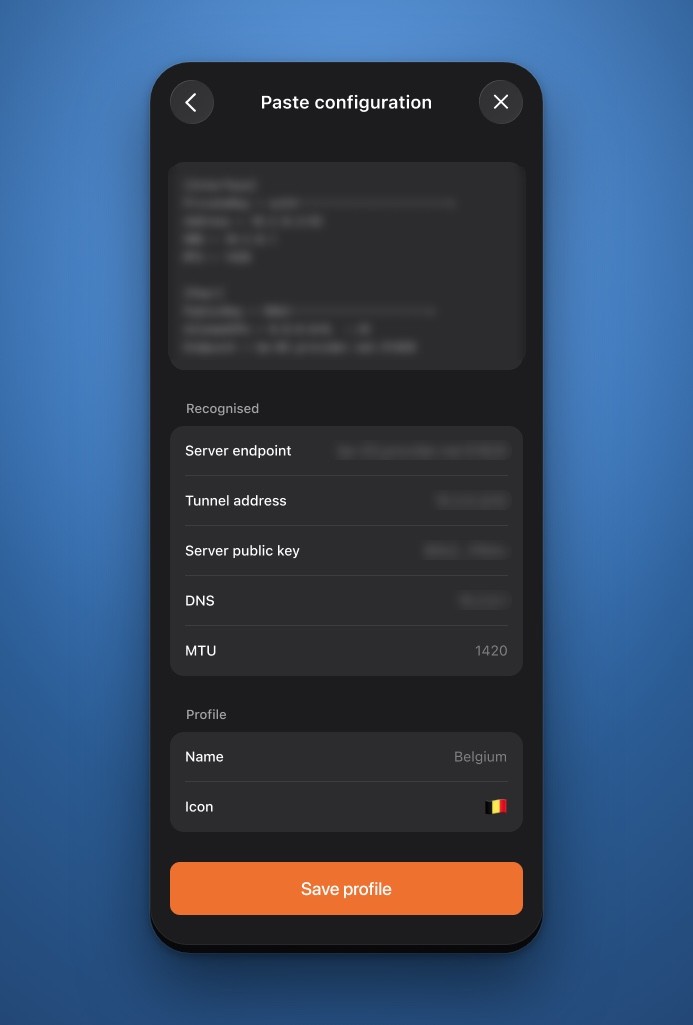
The Recognised list is your proof the paste was complete.
If Recognised stays empty, you either copied part of the text, or copied from a screenshot. Swiptv reads text, not images.
Nothing leaves the device
The text is parsed on your device. It is not sent anywhere, and the private key is moved into the Keychain as soon as you save.